PulseMDPulseMD
Patient, family and frontline voice

Patient feedback and surveys. More ways to hear what matters.

Capture patient and family voice and lived experience as care happens. A concern raised quietly. A kindness a family remembers. Bring their words together with staff observations and survey responses, so your team can see what deserves attention.

Watch the experience

A small moment to share. A clearer way to respond.

See how a patient opens a QR feedback experience, shares what happened and, through a separate care invitation, stays connected with their team. Follow the journey on real product screens.

A family member speaks “Nobody explained why Mum’s evening routine had changed”, selects communication and shares the observation. This is an animated example using fictional data.

Animated voice-capture example. No microphone access or recording.

From a QR code to ongoing careRecorded product walkthrough · fictional demo data · audio and captions
Read the film transcript

Meet Aroha. Her cancer journey unfolds over months: treatment planning, chemotherapy, recovery and follow-up. This fictional story uses real PulseMD screens at Te Awa Health. At hospital, Aroha can start with something as simple as a QR code. This is an existing patient feedback code for the Oncology Day Unit. Scanning it opens the hospital's feedback experience in a phone browser. There is no app to download. The public feedback code is an entry point for service feedback. It does not unlock a private patient record or enrol someone in identified care. The provider chooses the capabilities relevant to its services: real-time feedback, scheduled Heartbeat check-ins, care-team follow-up and requests for contact. Aroha encounters these through the appropriate patient experience or care invitation. During treatment, Aroha wants to explain a mixed experience. The nurses have been wonderful, but she was unsure who to contact when her treatment appointment changed. She types the observation in her own words. She continues, chooses anonymous and shares the signal. Here is the recorded submission and its receipt from our fictional demo. Her name is not attached through this pathway, and the comment does not become an entry in her identified Care record. People should still avoid putting identifying details in the words they submit; choosing anonymous cannot make identifying content anonymous. This existing oncology theme brings together concerns about waiting for chemotherapy. This is a separate example; we are not claiming Aroha's comment has already joined it. PulseMD supports AI-assisted themes with human review. This curated demonstration uses reviewed theme wording. Now follow Aroha home between visits. Her chemotherapy programme offers a Heartbeat every seven days. Before taking part, the patient can see the purpose, who reads the answers, the team's review hours and urgent-help instructions. Saying no does not change her care. Let's complete the questionnaire using the product's patient preview. We are replaying Aroha's existing week-one answers, without saving another response. First: how much has nausea affected her this week? Aroha chooses somewhat, then moves on. Next: how tired has she felt? She chooses a little tired. Then she answers the third question: how is she managing eating and drinking? This week, the answer is well. Before completing the check-in, Aroha reviews all three answers. She sends the check-in to the team and sees a receipt explaining when it should be reviewed. Several weeks later, the same questions tell a different story. In week four, nausea is affecting Aroha a lot. She selects very tired, and says eating and drinking are okay. She reviews those answers, asks for contact and completes the preview check-in. For the authorised care team, Aroha's actual record brings her answers together over time. Week one and week four can be compared directly. The missed check-in in week two remains visible as well. Staff can consider the sequence rather than treating each questionnaire as an isolated response. Aroha's record already includes a follow-up owned by Aisha Rahman. Staff can review the concern, record a contact attempt and its outcome, and keep the next step visible. Here we open that workflow without saving a new attempt. The team decides what follow-up is appropriate. Aroha can also ask for help with a practical concern. In this separate patient-preview example, she requests an afternoon call and explains that she feels overwhelmed and is unsure who to speak to about her next appointment. The working request form and confirmation show how she can ask the team for contact. This illustration is separate from her saved check-in history. For urgent symptoms or emergencies, Aroha still follows her provider's established clinical pathways. PulseMD complements clinical records, assessment and monitoring. Patient Experience leaders need a wider perspective. Across participating services, themes and trends help them explore recurring concerns, positive experiences and changes over time. In this separate existing example, an equipment issue has owners, tasks and a review, making the organisational response visible. The regional view brings Te Awa's participating hospitals and services into one organisational picture. This is a view within one fictional organisation, not unrestricted sharing of identified patient histories. It can complement surveys, complaints and other feedback processes with a more continuous source of experience information. Return to Aroha. Three perspectives now fit together: her voice, captured simply; her care team's understanding of how her experience changes; and the organisation's ability to learn across services. From feedback at the point of care to check-ins between visits, PulseMD helps teams listen throughout the journey and turn what they hear into meaningful action.

01 / Make it easy to contribute

A passing observation. A quick rating. A question worth asking.

Capture patient and family voice and lived experience in the moment, through voice, text, ratings and surveys. Give people room to describe care in their own words, with staff observations alongside to help your team understand the whole picture.

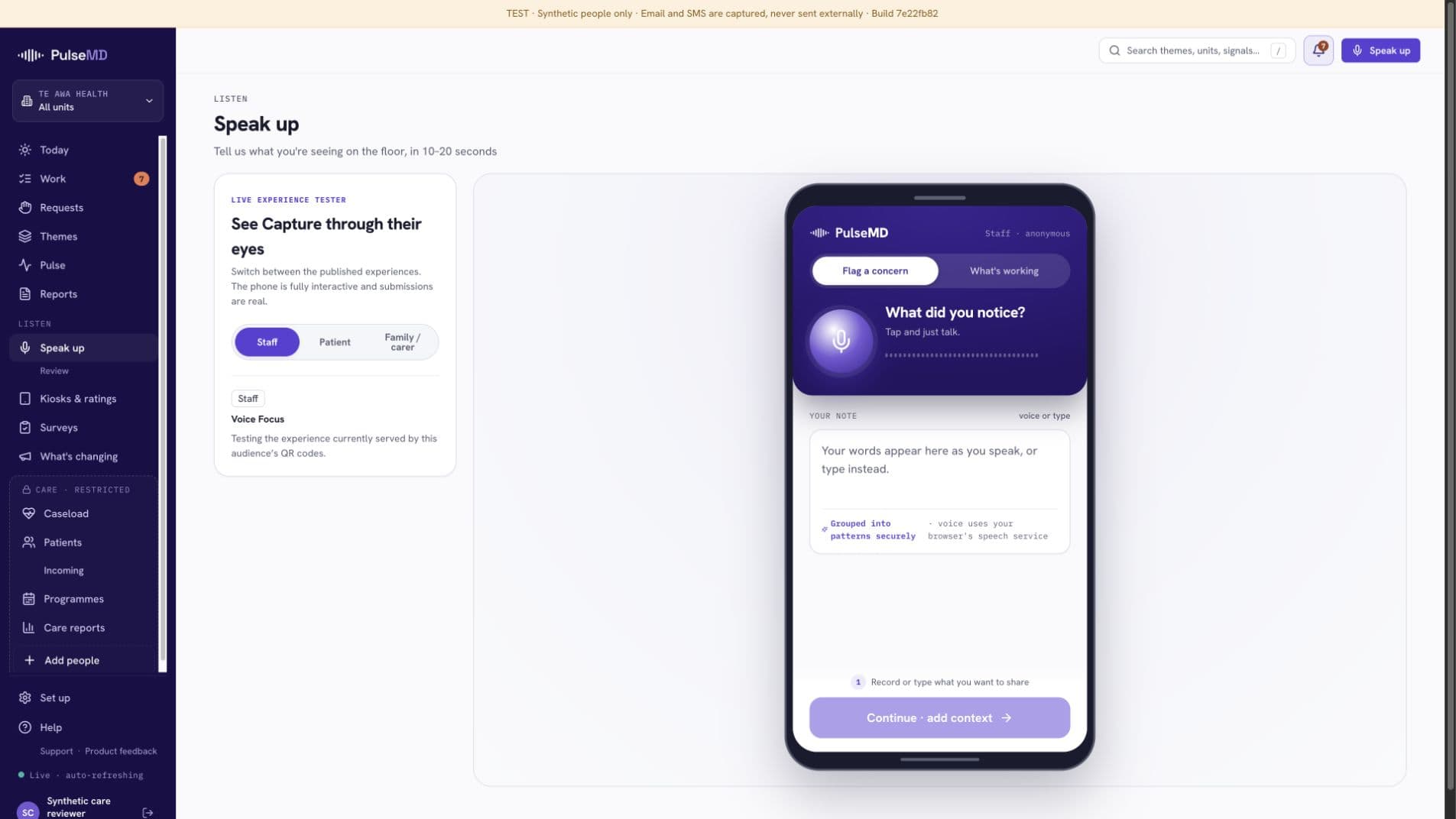
PulseMD’s actual staff phone preview, with voice recording, text entry and the Continue control inside the device frame
Speak or type. Add the context.Actual product phone preview · staff experience

Voice & text signals

For the things you didn’t know to ask

Place a QR touchpoint where care happens. People open the capture page and share a concern or something that went well, in their own words.

Less reliance on someone remembering it for the next meeting.
Kiosks & ratings

For a quick response at the point of care

Set up a shared tablet with a published rating screen. Choose its location and presentation, and manage the devices used by your services.

A simple way to participate without needing a personal device.

Structured surveys

For the questions you need to answer

Build a questionnaire, choose who it is for and when it runs, then share its link or QR code. Review scores and comments with their collection context.

Ask consistently and keep the detail behind the answer.

Bedside requests

For a practical need that needs a response

Offer a menu of practical requests and route them to the staff request board. Keep immediate service needs distinct from longer-term improvement work.

A clear place for staff to see and manage incoming requests.

Your service explains the participation and privacy arrangements for each channel. Urgent help, incidents and safeguarding keep their established routes.

Kiosks & ratings

Make a shared device feel part of your service.

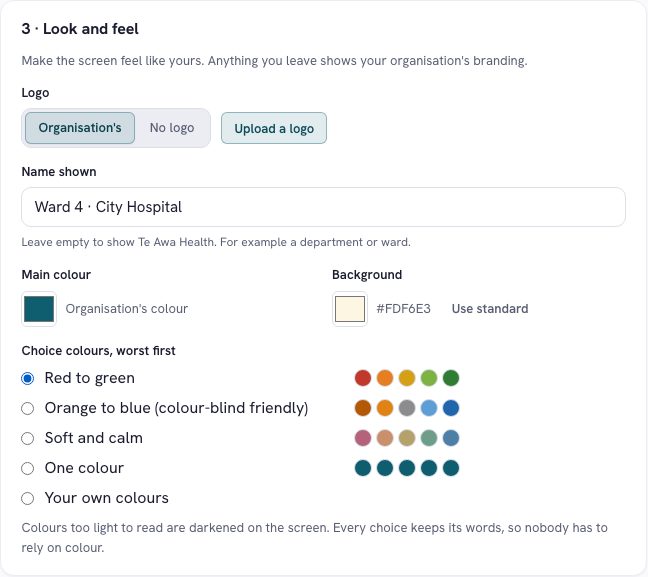
Choose the name, branding and rating presentation for a tablet touchpoint. Keep words alongside colours, so the choices remain understandable.

Manage where devices are placed and which published screens they show. Your team can offer a consistent experience across the places people receive care.

Kiosk configuration with service name, branding and labelled colour choices
Configure the rating experience for the place it will be used.Product walkthrough · fictional demo data · select to enlarge
Surveys with a purpose

Ask the right question. Understand the answer.

Want to understand discharge communication, a recent visit or a change to your service? Build a survey around that question.

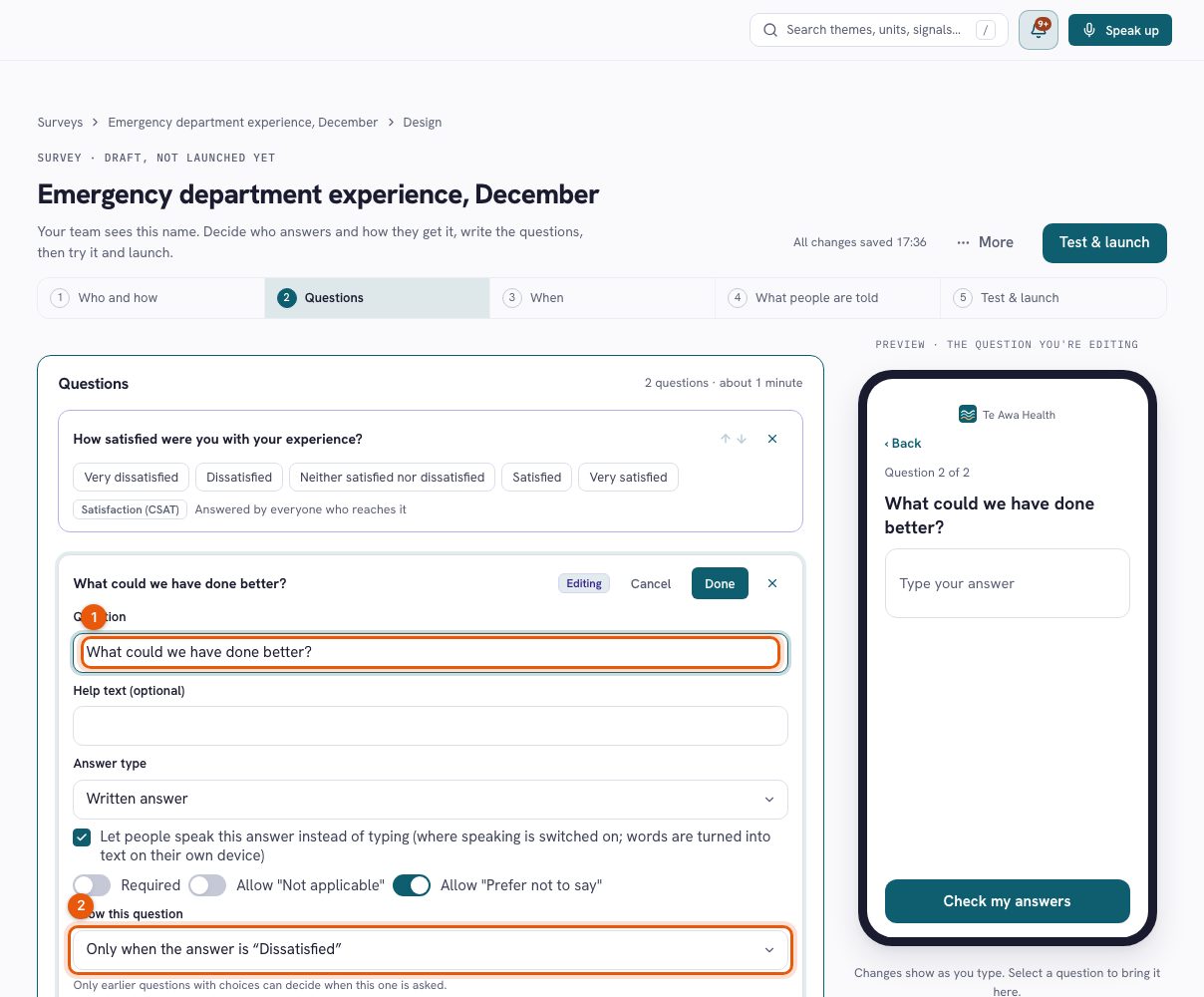
  1. DesignChoose questions and answer types. Use branching to ask relevant follow-up questions, and preview the experience as you build.
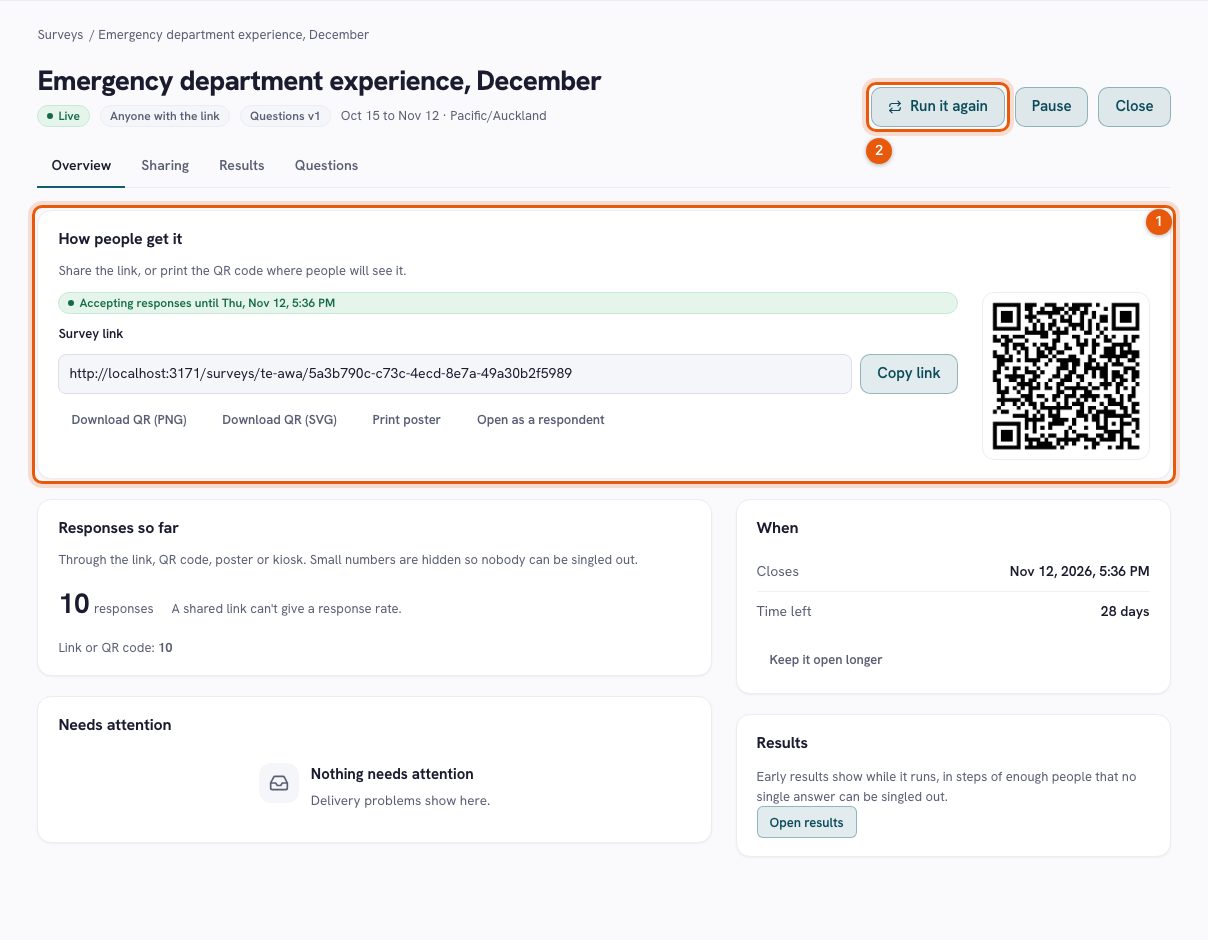
  2. ShareSet the audience and collection window. Share the survey link, download its QR code or print a poster.
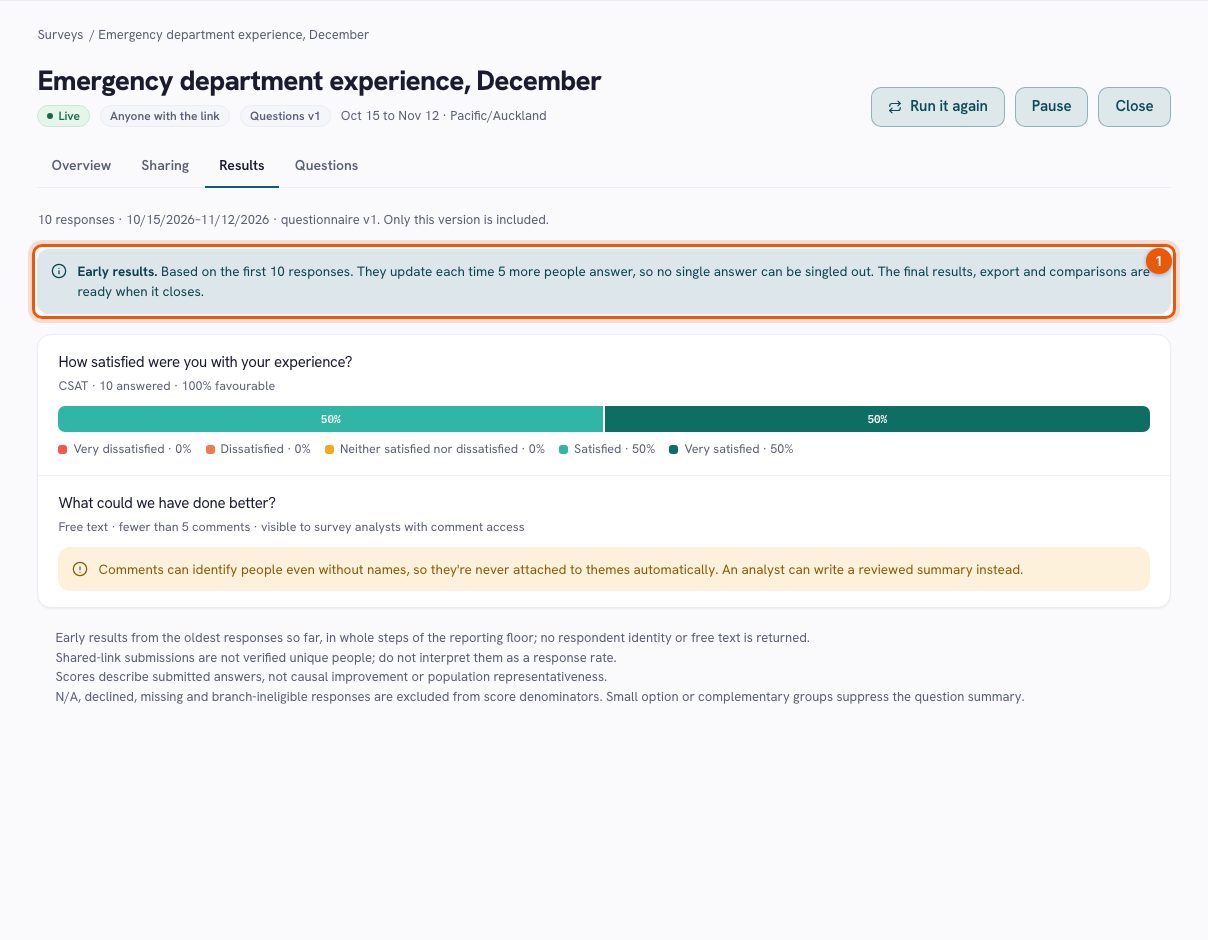
  3. ReviewSee results with the question version and reporting period. Review comments and prepare a finding that can inform improvement work.
Survey designer showing satisfaction and written questions, conditional branching and a phone preview
Build the question and see exactly what someone will be asked.Product walkthrough · fictional demo data · select to enlarge
Survey sharing page with link, QR code, poster and response collection status
From a published survey to a link or QR code people can use.Product walkthrough · fictional demo data · select to enlarge
Survey results with satisfaction distribution, reporting context and protected comments
Read the result alongside the context that makes it meaningful.Product walkthrough · fictional demo data · select to enlarge

Make room for the voices closest to care.

01

Let people tell it in their own words

Short voice and text observations preserve the detail behind an experience. Patients, families and staff can share concerns and recognise care worth repeating.

02

Meet people where care happens

Offer a tablet rating or a QR touchpoint. Manage published screens and device placements so each service knows where and how people can contribute.

03

Ask with purpose

Use structured surveys when you have a defined question. Review results with their collection context, rather than treating every response as the same kind of evidence.

04

Give the pattern a closer look

Bring related observations into themes. Review the supporting signals, refine the issue and decide what needs to happen next.

Questions worth asking

Know what to expect.

Can we collect praise as well as concerns?

Yes. Good care deserves attention too. Keep the detail of what helped so the team can recognise it and consider what others could learn.

Are all contributions anonymous?

Participation arrangements depend on the experience. Public feedback, confidential surveys and identified Care have different information and access rules. Explain the chosen arrangement before someone contributes.

Does AI decide what action to take?

No. Automated grouping helps organise related signals. People review themes and decide what to do. Optional language-model assistance is a separately configured capability.

Can a bedside request become a signal?

Practical requests have their own staff response workflow. They are distinct from service-feedback themes and do not replace the service’s urgent-help channels.

A contribution deserves somewhere to go.

Take a reviewed theme into improvement work. Give it an owner, agree the next step and return to the people who helped you see it.

A relevant walkthrough. A practical conversation. No pilot commitment. · Explore the Trust Center