Manage care between visits. Keep experience and outcomes in view.
A question often comes later. So does a change in how someone is feeling. Stay connected through agreed check-ins, with a clear view of what people have shared and what your team needs to do next.
Keep the person, their progress and the next step together.
Give people agreed check-ins to tell you how they are doing. Bring their answers, contact requests and follow-up into a person-centred caseload.
- See who needs a review. Read the response in context and see what is due or still unowned.
- Pick up where a colleague left off. Keep contact attempts, responsibility and next steps visible to the authorised team.
- Understand change over time. Review questionnaire responses and eligible measure histories alongside missing check-ins.
Private care stays private. Authorised teams access care records within the care workflow. Your service sets review hours and response responsibilities.
Read the film transcript
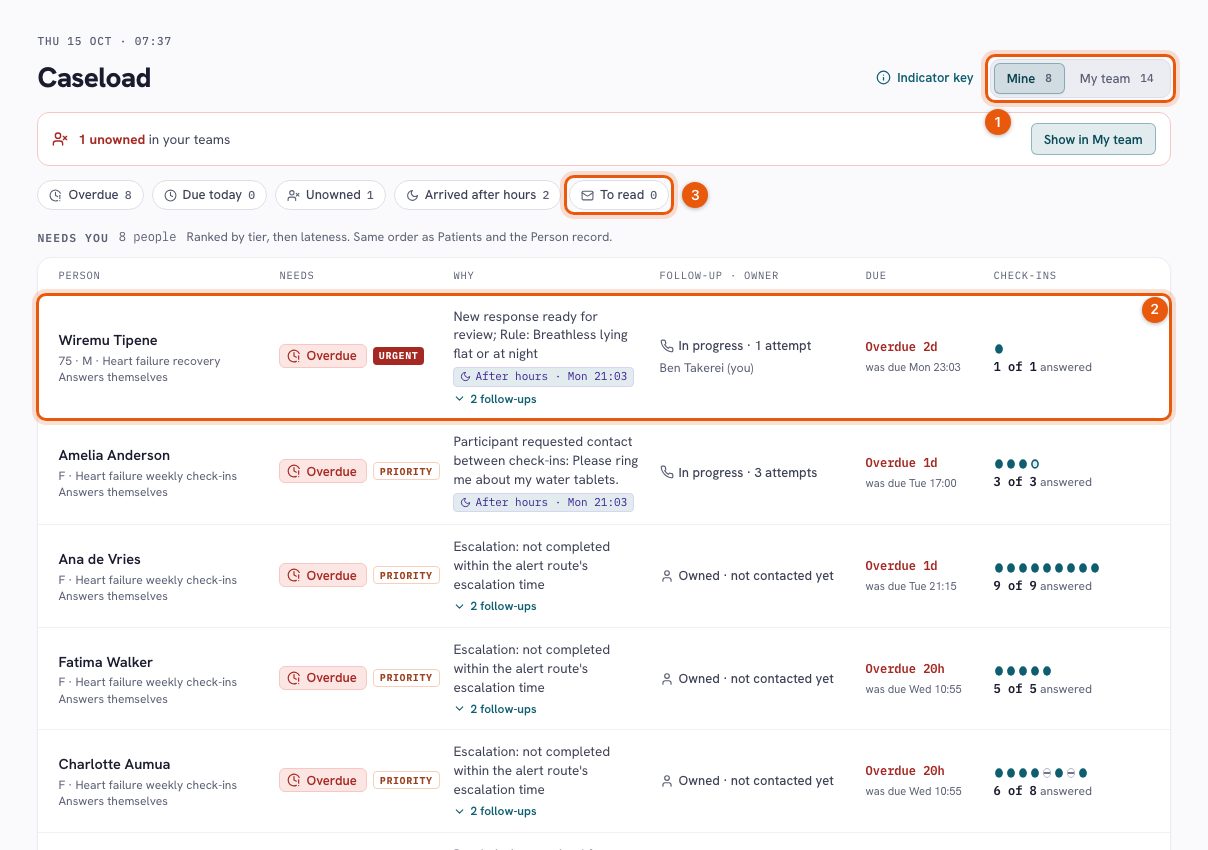
Between appointments, a person's experience can change. A care team needs a clear way to review what they share and keep the next step visible. This is a demonstration of PulseMD Care using fictional people and illustrative data. Start with the heart failure team's caseload. It brings together the reason someone needs attention, the person responsible, the due time and their check-in history. The team's review hours are shown here too. These are patient-reported check-ins, reviewed through the service's arrangements. Wiremu's response has triggered an urgent follow-up under a configured rule. Open his record and the context stays with him: who answers, his programme, the responsible clinician and the review hours. Ben is responsible, and the follow-up is already in progress. In Check-ins and scores, we can read the actual answers. Wiremu says he feels worse and reports breathlessness lying flat or at night. The screen preserves his response to the contact question as well. A rule helps route the response for human review; it does not make a diagnosis or decide treatment. Now open Follow-ups. Ben has recorded a phone call with no answer, and a note that he will try the landline next. That distinction matters. An attempted call is part of the record, while the follow-up remains in progress. The contact form gives the team a place to record what happened and the next step. Here we are previewing that workflow. We are not making a call or recording a new clinical outcome. Back on the person record, responsibility and the outstanding follow-up remain visible. The team can return to the same context instead of reconstructing it from separate notes and messages. PulseMD Care supports that continuing relationship: hear what the person reports, review it in context and organise follow-up. The service sets its response process and coverage. Stay connected between visits.
Hear how care feels. See how people are doing. Act while it matters.
Bring patient-reported experience measures (PREMs) and outcome measures (PROMs) into the care journey. Schedule the right questions, review responses as they arrive and follow change over time.
PREMs: the experience of care
Understand communication, involvement and the experience of your service through agreed experience measures.
PROMs: health and quality of life
Use appropriate outcome measures to understand symptoms, function and reported wellbeing at agreed timepoints.
Care management: the next step
Bring responses into the team’s review workflow, with responsibility, contact history and follow-up visible.
Measurement that stays connected to the person.
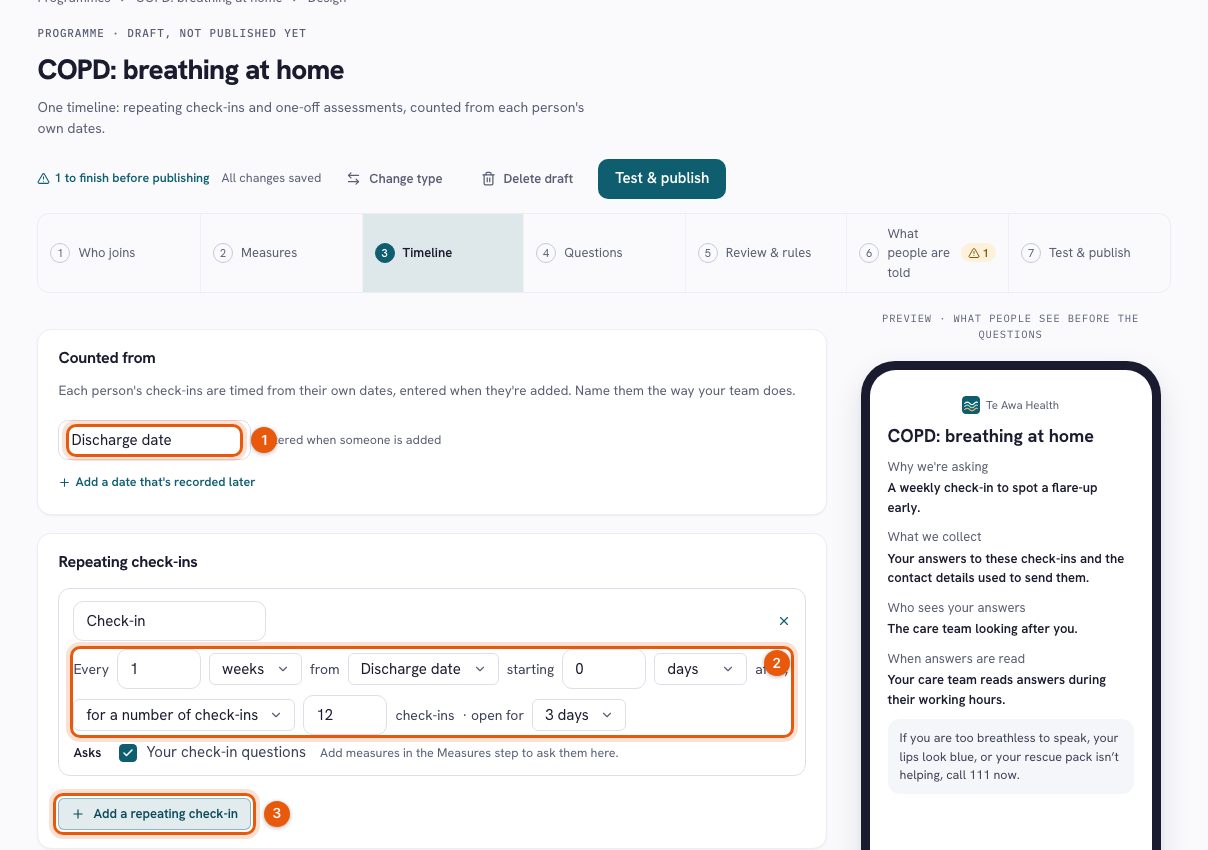
- Ask at the right moment. Set repeating check-ins and assessments around dates such as discharge, with baseline and follow-up timepoints.
- Keep up as answers arrive. Review incoming responses and configured review-rule flags in the care workflow, within your team’s agreed coverage.
- See change, and see what is missing. Follow score histories and open the original answers. Missed check-ins stay visible rather than appearing as zero scores.
- Understand programme results. Compare eligible paired responses and keep participation and missing data alongside the outcome.
Real-time visibility of submitted information supports team review; it does not promise continuous observation or an immediate clinical response. Measures require the appropriate permissions, scoring and service approval.
Read the film transcript
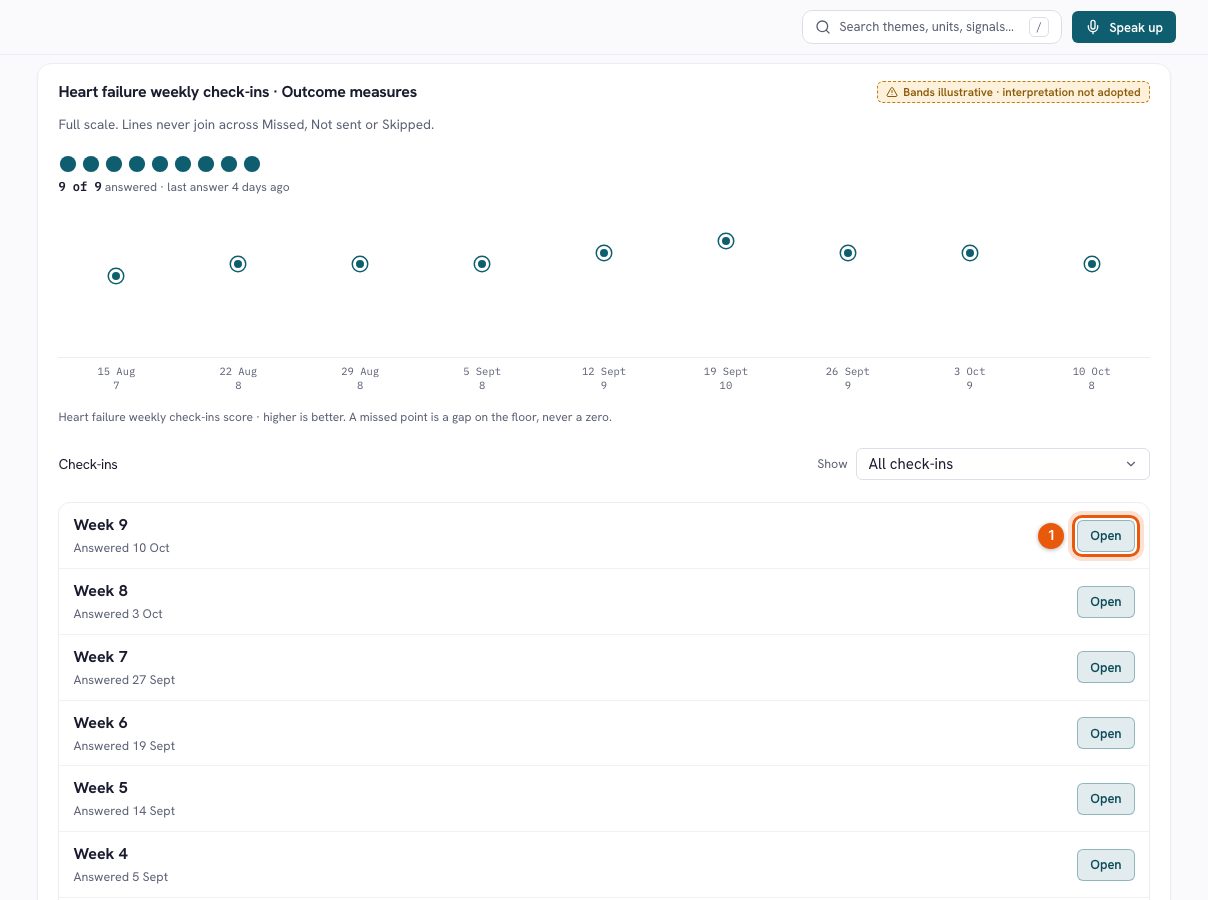
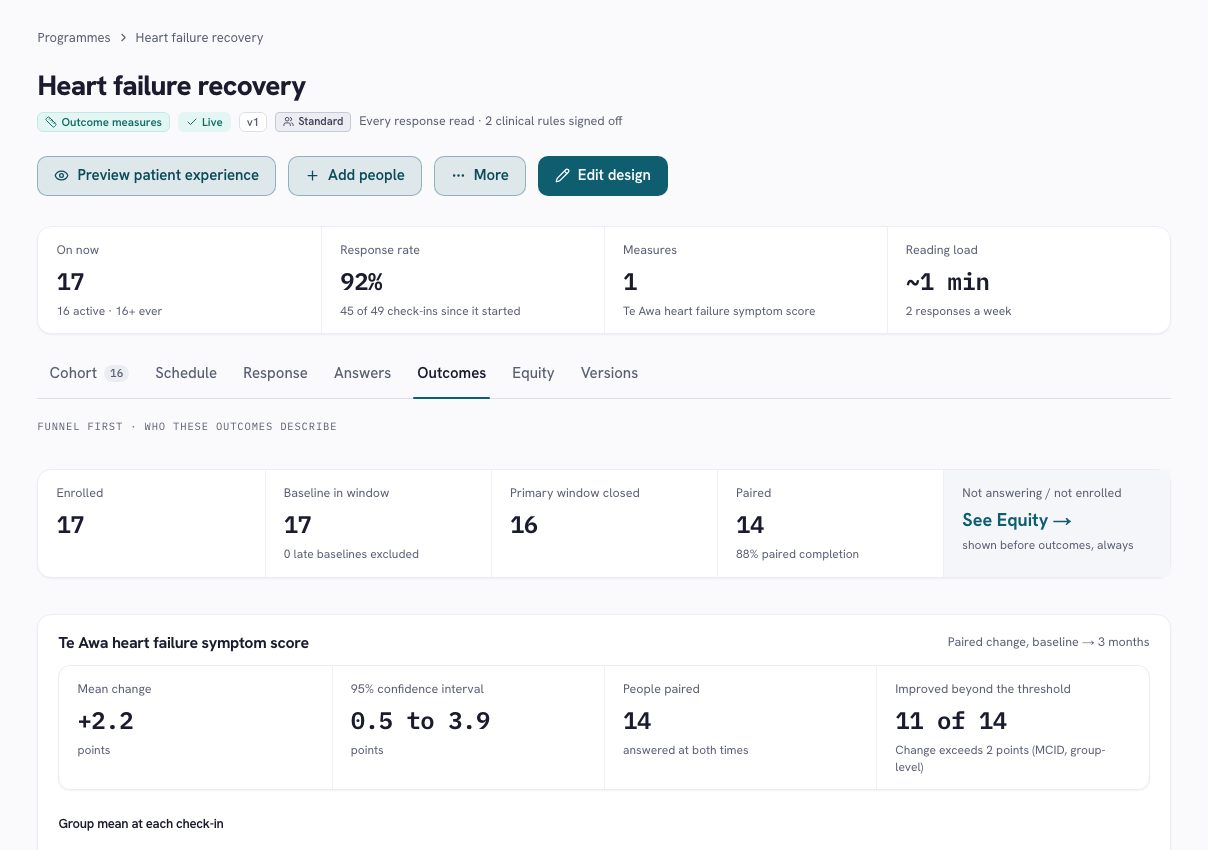
A care programme needs more than a set of questions. It needs a purpose, a schedule, people who will review the answers, and a clear account of what its results mean. This walkthrough uses Te Awa Health’s fictional heart failure recovery programme. Its symptom score and results are illustrative, not a claim about a validated clinical measure or customer outcomes. The programme page brings participation and current work together. People remain on the version they joined. A published version can be in use while changes are being prepared in a draft. The cohort shows check-in history and any reason for attention, linking the programme design to the team’s everyday work. Open the existing draft to see the design steps. The programme begins with a template, then covers who joins, anchors and timepoints, measures, review rules, messages and review hours. The participant preview sits alongside the configuration. That lets the team connect each design decision with what a person will actually see. The published schedule uses discharge as its anchor. It asks at discharge, six weeks, three months and six months. Each point has an answer window, and the primary comparison is identified. The table shows which measure, heartbeat and custom questions are included, together with the expected effort. Timing is part of the meaning of the result, not just a reminder setting. Review and rules define how the team handles responses. Here the mode is every response read. The configured rules include a request for contact, breathlessness at night, and a change in the symptom score. Clinical rules show a named approver and a review date. An operational rule covers repeated closed windows without an answer. These rules create work for people; they do not replace clinical judgement. Review hours and routing belong to the care team. The programme’s participant wording explains who reads answers, while urgent-help information remains visible. A service needs a workable review commitment, including what happens outside those hours. The software makes that arrangement explicit, rather than implying that an online answer is monitored continuously. Before reading outcomes, look at response. The table separates answered, missed, not sent and skipped check-ins. In this example, the six-week and three-month windows each have fourteen answers from sixteen closed windows. A skipped check-in is excluded from the rate. A check-in that was never sent is a team-side gap, rather than a failure attributed to the person. The outcomes view starts with the funnel. Seventeen people have an in-window baseline, sixteen have reached a closed primary window, and fourteen have a paired result. That is the group the comparison describes. The chart keeps the full score scale and shows separate timepoint groups. It does not draw a continuous line that implies every point contains exactly the same people. The paired comparison shows a mean change and an uncertainty interval. The page also warns that people who answer at follow-up may differ from those who do not, and that these figures are not adjusted for case mix. Small groups are suppressed. In this demo, the numbers illustrate how a result is presented; they do not establish that the service caused a clinical benefit. Return to the cohort and the design has a practical purpose. Questions arrive at meaningful points, review arrangements are visible, and the team can see outstanding follow-up alongside participation. A programme can be refined without silently rewriting the version that existing people joined. PulseMD brings programme design, everyday response and measurement into one connected workflow. The value is a clearer account of what was asked, who was heard, what the team did, and what the resulting evidence can support.
See the person behind the next response.
Give people a way to keep in touch
Invite people into a care programme with clear participation and review arrangements. Check-ins let them share how they are doing and request contact within the programme.
See what needs your attention
Bring responses and follow-up into a person-centred caseload. Read the exact answer, understand the context and see what is still waiting for the team.
Keep the next step visible
Record contact attempts, next steps and handovers. Help colleagues see what has been read, what has been tried and who is taking the response forward.
Include the people who help
Distinguish someone’s own answer, assistance with completing it, authorised answering on their behalf and a supporter’s own wellbeing.
Put reported progress in context
Use programme questionnaires, agreed timepoints and appropriate measures. Review score histories alongside missing responses, the questions asked and who answered.
Keep the person informed
Share appropriate private updates and support participation choices. Make review expectations understandable before asking someone to take part.
Know what to expect.
Is Care continuous clinical monitoring?
Care supports review of information people report through check-ins and requests. The service sets its review hours and response arrangements. It does not imply continuous observation or a 24-hour response.
Are private Care responses used in public feedback themes?
Private Care stays private. Identifiable records, responses and scores stay within authorised care workflows, separate from public feedback themes, service updates and benchmarking.
Can we use our existing questionnaires?
Questionnaires and measures need the appropriate edition, permissions, scoring and service approval. We can discuss the instruments and programme design your service needs.
What do we need before starting?
Agree the cohort, participation process, responsible team, review coverage and follow-up arrangements. Confirm the modules, delivery channels and connections needed for that programme.
Make the time between visits part of the conversation.
Explore a care programme built around your service, the people you support and the review arrangements your team can provide.
A relevant walkthrough. A practical conversation. No pilot commitment. · Explore the Trust Center